Introduction
Computer programs consist of instructions that operate on data. When a computer executes a program, it must store both the program’s instructions and working data in an accessible location. This location is usually the computer’s Random Acccess Memory, which we will simply refer to as memory.
The computer’s Operating System (OS) is responsible for managing how programs access memory. In doing so, it must balance several important goals:
- memory access must be fast and efficient
- programs must be isolated so that one does not violate or corrupt another program’s memory
- when a program requests for more memory, the OS should provide it if possible
Before exploring further, it helps to see how a program actually uses memory to carry out its work.
A Program’s View
A program needs memory for three distinct types of data:
- program’s instructions
- working data that has fixed size during compilation
- working data whose size cannot be determined during compilation
For a concrete example, see the following pseudo program
package main

import (
	"fmt"
)

var numberFrequencies map[int]int

func sumArray(nums []int) int {
	numberFrequencies = map[int]int{}
	total := 0
	for _, v := range nums {
		total += v
		numberFrequencies[v] += 1
	}
	return total
}

func main() {
	nums := []int{1, 2, 3, 4, 1, 2, 3, 4, 5, 6}

	result := sumArray(nums)

	fmt.Printf("Sum: %d, Frequency: %v\n", result, numberFrequencies)
}
The above code is compiled into an executable binary. When you run the binary, its machine instructions are loaded into memory, allowing the CPU to access and execute them.
A program consists of functions that run and eventually complete (return). A function can also invoke other functions. To support this behaviour, most systems use a call stack. When a function begins executing, a stack frame is pushed onto the stack. This is a block of memory which stores the function’s local data and return address.
When the function returns, the stack frame is removed, and the memory it used becomes available for the next function call.
We can use the above program to see how stack frames are used. When the functin main() is executed, a stack frame is allocated for the main function. Since the variables bigArray and result variables are scoped within main(), the stack frame will also contain these variables.
When the function main() invokes sumArray() function, another stack frame is allocated for sumArray(). It will also contain its local variable total.
Noticed the sumArray() function appends to a global variable userInputs. Since the program does not know how big it can grow, it can’t store it in a fixed stack frame. Therefore, it will be allocated on the heap - an expandable memory region. Also note that since we are adding more elements into the map, Go runtime will have to handle it by growing its size. This eventually translates to requesting for more memory from the OS.
Once the sumArray() completes, we don’t need to track the local variables such as total anymore. We can “discard” the data by popping the stack frame.
In contrast, since the numberFrequencies is allocated on the expandable heap region, it will not be discarded, and will still be available. Because of this, the main() function is able to retrieve and print out its value.
The above is a simplified example to illustrate how memory is important for running programs. The usage of stack frames and heap differ across programming languages. The takeaway here is that most programs require both stack frames and heap to function, and the OS needs to accomodate a program’s request for more memory.
Memory as an abstraction
CPU employs time sharing - it executes one process at a time, and swap it out to run the next. Various CPU scheduling policies aim to optimise this process.
What about memory? We could follow how CPU does it - load an entire program into memory and execute it one at a time. When we want to execute other programs, we persist the program state in disk, and repeat the process. The main issue with this approach was its poor performance.
This became a driver for memory sharing, where multiple programs can reside in memory at the same time. This yields better performance, but makes protection an important issue.
OS needs to provide an easy to use and safe interface to memory management. This abstraction over machine memory is called the address space, and it is the running program’s view of memory in the system.
This address space of a process contains all of the memory states of a running program
- the program’s code, in the instruction area
- the program’s function calls chain and local variables in the stack area
- the program’s global variables, or dynamically allocated variables, in the heap area
The following is one simple way to structure a program’s address space. We assume the code region is fixed (what about interpreted languages then?), and the stack and heap areas will change in size as the program runs. Hence, they are placed at opposite ends, and grows towards the empty region in the middle.
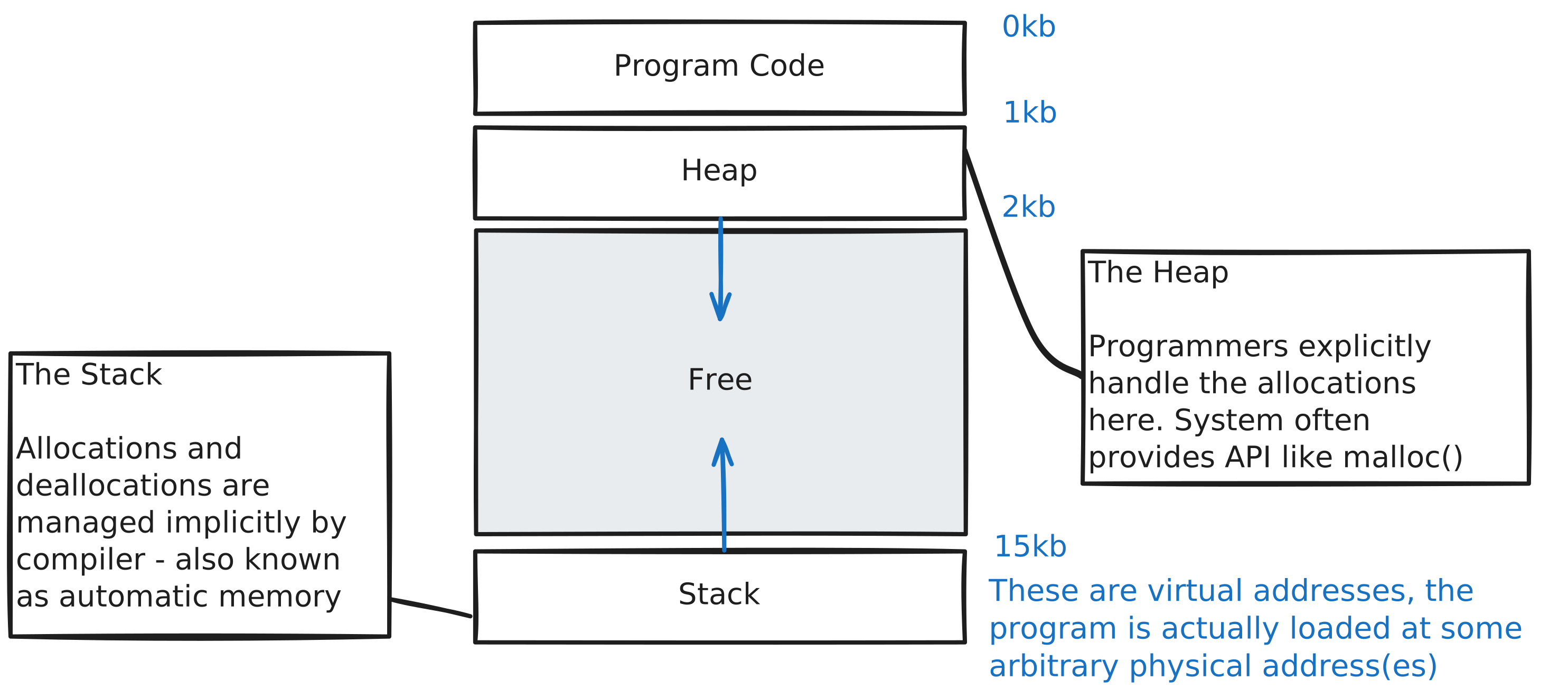
The above organisation is an abstraction the OS provides to running programs. The program’s memory access may not be at physical addresses 0 through 16kb. Since multiple programs are loaded into the memory, they all have different physical addresses. The OS provides the virtualisation to translate the program’s memory address to the actual physical memory address.
TODOs
Explain the current OS implementation - from a process’s perspective, the addresses it uses are virtual address, and mapped to a physical address
Explain the goals of memory virtualisation
Goals of virtualising memory
- These goals guide the design of memory virtualisation, understanding these goals helps to understand why certain design choices are made
- Transparency: OS memory management should be invisible to a running program: QN how about lower level languages like C and Rust. A program interacts with the memory as if it operates on its own private physical memory. OS does the work to multiplex memory among many different jobs, providing this illusion of private memory region.
- Efficiency: OS strives the make virtualisation as efficient as possible both in terms of time and space. This can be done through kernal software, or rely on hardware support for greater efficiency.
- Protection: this is a key requirement for multitenancy, where one program’s memory is well protected from other programs. Protection enables isolation among tenant processes, each process runs in its own isolated space.